


Project Overview
This project is a SQL case study where I analyzed a hospital database to answer real operational and business questions using SQL. The database contains information about patients, admissions, and doctors, and I used it to explore patient history, admission trends, and doctor assignments.
The goal of this project was to go beyond basic SQL queries by solving practical business questions with relational database concepts. Throughout the project, I used joins, aggregate functions, subqueries, Common Table Expressions (CTEs), and window functions to extract meaningful insights from the data.
The Business Problem
The hospital stores all of its operational data in a central database. The hospital owner wants to use this data to better understand patient admissions, doctor assignments, and overall hospital activity.
To support these decisions, the owner wanted answers to the following questions:
- Which patients have been admitted to the hospital multiple times for the same diagnosis?
- For each hospital admission, who was the patient, what diagnosis was recorded, and which doctor handled the case?
- Which patients are registered in our hospital system but have never been admitted?
- What are the highest, lowest, and average numbers of patient admissions we receive in a single day?
- What is the most recent hospital admission for each patient, and which doctor treated them during that visit?
- How does the number of patient admissions change from one day to the next?
Project Objectives
My main goal was to analyze and understand the database, then use SQL to answer the business questions above.
More specifically, I wanted to:
- Explore the relationships between patients, admissions, and doctors.
- Write efficient SQL queries to answer real business questions.
- Practice using different SQL concepts, including joins, aggregations, CTEs, subqueries, and window functions.
- Present query results in a way that is easy to understand and useful for decision-making.
Data & Preparation
The database schema I worked with is shown below.
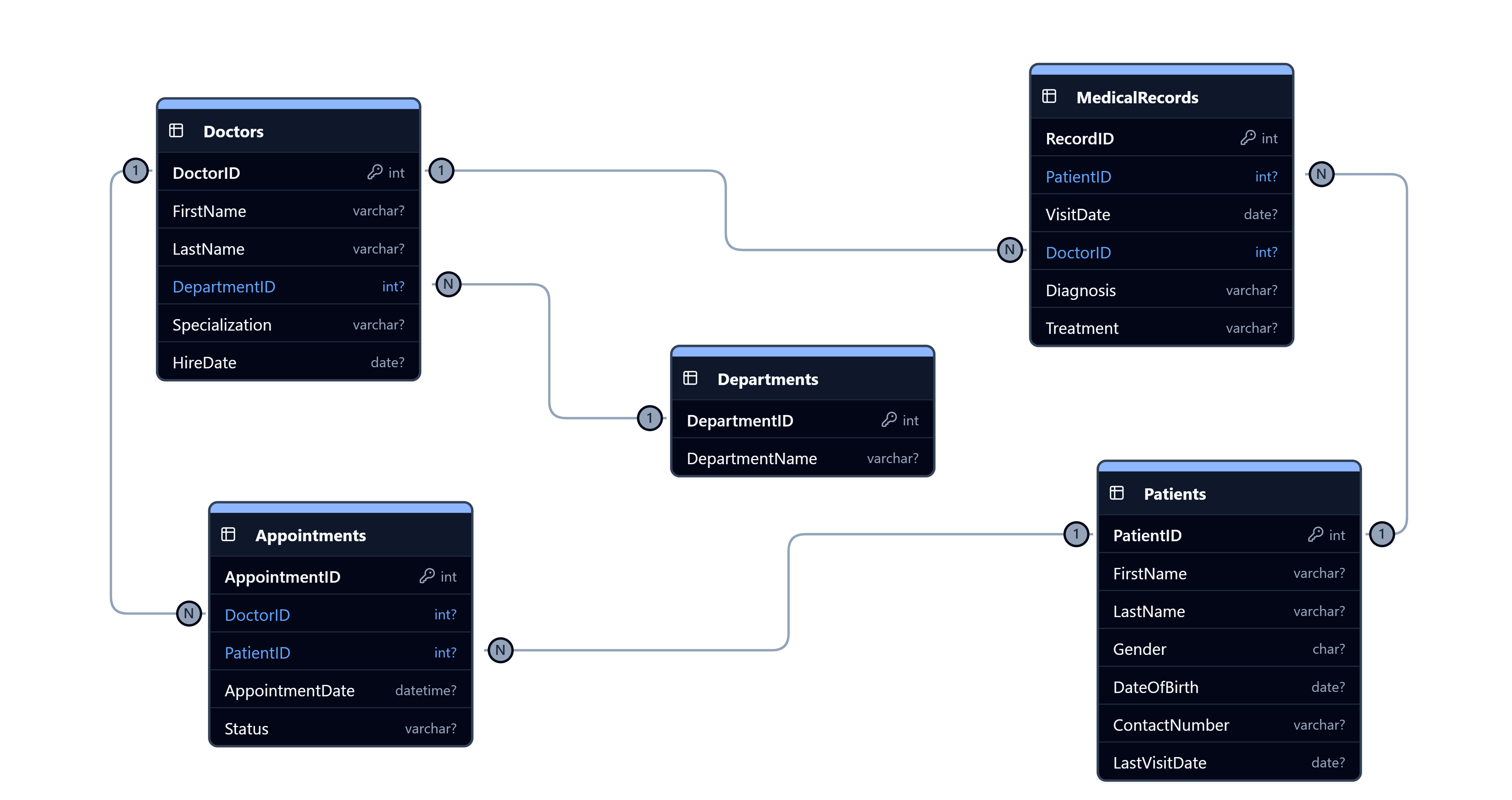
Before writing any queries, I studied the database schema to understand how the tables were connected. I identified the primary and foreign key relationships between the patients, admissions, and doctors tables and mapped how patient records flow through the hospital system.
After understanding the schema, I wrote SQL queries to answer each business question and validated the results against the relationships in the database.
Answers
Question 01: Which patients have been admitted to the hospital multiple times for the same diagnosis?
Query:
SELECT
    patient_id,
    diagnosis
FROM admissions
GROUP BY
    patient_id,
    diagnosis
HAVING COUNT(*) > 1;
Result:
| patient_id | diagnosis |
|---|---|
| 137 | Pregnancy |
| 320 | Pneumonia |
| 1577 | Congestive Heart Failure |
| 2004 | Left Shoulder Rotator Cuff Repair |
| 2859 | Severed Spine At C3 |
Question 02: For each hospital admission, who was the patient, what diagnosis was recorded, and which doctor handled the case?
Query:
SELECT
    p.first_name || ' ' || p.last_name AS patient_name,
    a.diagnosis,
    d.first_name || ' ' || d.last_name AS doctor_name
FROM admissions AS a
    JOIN patients AS p ON a.patient_id = p.patient_id
    JOIN doctors AS d ON d.doctor_id = a.attending_doctor_id;
Result:
| patient_name | diagnosis | doctor_name |
|---|---|---|
| Donald Waterfield | Ovarian Dermoid-Cyst | Lisa Cuddy |
| Donald Waterfield | Ineffective Breathing Pattern R/T Fluid Accumulation | Jenny Pulaski |
| Jiji Sharma | Cardiac Arrest | Joshua Green |
| Jiji Sharma | Congestive Heart Failure | Mickey Duval |
| Sue Falcon | Asthma Exacerbation | Miriam Tregre |
Question 03: Which patients are registered in our hospital system but have never been admitted?
Query:
SELECT
    patient_id,
    first_name,
    last_name
FROM patients
WHERE patient_id NOT IN (
    SELECT patient_id FROM admissions
);
Result:
| patient_id | first_name | last_name |
|---|---|---|
| 2 | Mickey | Baasha |
| 4 | Blair | Diaz |
| 5 | Charles | Wolfe |
| 14 | Rick | Bennett |
| 19 | John | West |
Question 04: What are the highest, lowest, and average numbers of patient admissions we receive in a single day?
Query:
WITH cte AS (
    SELECT
        admission_date,
        COUNT(*) AS total_ads
    FROM admissions
    GROUP BY admission_date
)
SELECT
    MAX(total_ads) AS max_ads,
    MIN(total_ads) AS min_ads,
    ROUND(AVG(total_ads), 2) AS avg_ads
FROM cte;
Result:
| max_ads | min_ads | avg_ads |
|---|---|---|
| 30 | 4 | 13.88 |
Question 05: What is the most recent hospital admission for each patient, and which doctor treated them during that visit?
Query:
SELECT
    p.first_name || ' ' || p.last_name,
    MAX(a.admission_date),
    d.first_name || ' ' || d.last_name
FROM patients AS p
    JOIN admissions AS a ON p.patient_id = a.patient_id
    JOIN doctors AS d ON d.doctor_id = a.attending_doctor_id
GROUP BY p.patient_id;
Result:
| patient_name | ads_date | doctor_name |
|---|---|---|
| Donald Waterfield | 2018-11-06 | Lisa Cuddy |
| Jiji Sharma | 2019-01-24 | Joshua Green |
| Sue Falcon | 2018-11-08 | Simon Santiago |
| Thomas ONeill | 2018-06-24 | Mickey Duval |
| Sonny Beckett | 2018-09-18 | Tasha Phillips |
Question 06: How does the number of patient admissions change from one day to the next?
Query:
WITH daily_admissions AS (
    SELECT
        admission_date,
        cast(COUNT(*) as FLOAT) AS ads,
        LAG(COUNT(*)) OVER (ORDER BY admission_date) AS prev_ads
    FROM admissions
    GROUP BY admission_date
),
cte AS (
    SELECT
        admission_date,
        ads,
        prev_ads,
        ROUND((ads - prev_ads)/ ads * 100) AS percent_change
    FROM daily_admissions
)
SELECT
    admission_date,
    ads,
    prev_ads,
    CASE
    	WHEN percent_change < 0 THEN abs(percent_change) || "%" || " ▼"
        WHEN percent_change = 0 THEN percent_change || "%"
        ELSE percent_change || "%" || " ▲"
    END AS percent_change
FROM cte;
Result:
| admission_date | ads | prev_ads | percent_change |
|---|---|---|---|
| 2018-06-06 | 17 | NULL | NULL |
| 2018-06-07 | 9 | 17 | 89.0% ▼ |
| 2018-06-08 | 9 | 9 | 0.0% |
| 2018-06-09 | 18 | 9 | 50.0% ▲ |
| 2018-06-10 | 12 | 18 | 50.0% ▼ |
Key Insights
By querying the hospital database, I was able to uncover several useful operational insights:
- The database contains registered patients who have never been admitted, which may represent new patients or inactive records.
- Daily admissions vary significantly, ranging from 4 admissions on the quietest day to 30 admissions on the busiest day, with an average of 13.88 admissions per day.
- Retrieving the latest admission for every patient provides a quick view of each patient’s most recent interaction with the hospital and the doctor who treated them.
What I Learned
This project helped me become more comfortable solving real business problems with SQL instead of writing queries only for practice.
I learned how to read and understand a relational database schema before writing queries, choose the right SQL approach for different business questions, and combine multiple SQL concepts such as joins, subqueries, CTEs, aggregate functions, and window functions in a single solution.
The biggest lesson from this project was that understanding the business question is just as important as writing the SQL query. Once I understood what the stakeholder wanted to know, it became much easier to translate those questions into SQL and produce meaningful results.